
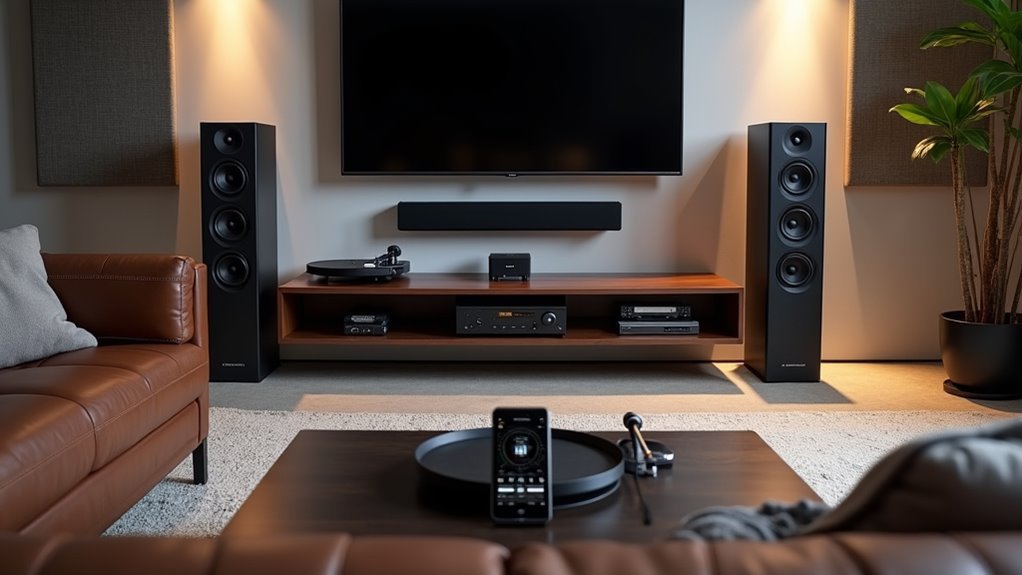
You’ve probably experienced that moment when you’re moving through your home and the music abruptly cuts out as you leave one room for another. Creating a seamless home audio ecosystem eliminates these frustrations, but there’s a strategic approach that separates amateur setups from professional-grade systems. The difference lies in understanding how each component works together, and there’s a specific sequence you’ll want to follow to avoid costly mistakes that could compromise your entire investment.
Planning Your Home Audio Ecosystem Layout and Requirements

The foundation of any exceptional home audio system starts with understanding your specific listening habits and room characteristics.
Your audio setup success depends on matching equipment to your primary usage—whether you’re streaming music, watching movies, or gaming competitively.
Measure your room dimensions and identify potential acoustic obstacles like large furniture or hard surfaces that could interfere with sound quality.
Strategic speaker placement becomes vital here; you’ll want to position speakers away from walls and corners to minimize unwanted reflections.
Set a thorough budget covering speakers, amplifiers, cables, and possible acoustic treatments.
Research brand compatibility to guarantee seamless integration between components.
Consider future-proofing your investment by choosing expandable systems that accommodate smart home integration or multiroom capabilities as your needs evolve.
Understanding Speaker Types and Their Role in Multi-Room Systems
When building your multi-room audio system, you’ll need to understand how different speaker types work together to create the perfect sound experience throughout your home.
Each speaker configuration—from 2-way bookshelf units to 3-way floorstanding models—serves specific purposes and delivers distinct frequency ranges that affect your overall audio quality.
You’ll also need to take into account how these speakers integrate across multiple rooms while ensuring proper power matching with your amplifiers.
Speaker Configuration Fundamentals
Although creating an exceptional multi-room audio system requires careful planning, understanding the fundamental speaker types and their specific roles forms the foundation of your setup.
Your speaker configuration should include floorstanding and bookshelf speakers for primary audio, center channels for dialogue clarity, and subwoofers handling frequencies below 80 Hz for deep bass impact.
You’ll find 2-way speakers with woofers and tweeters work well for general playback, while 3-way configurations add midrange drivers for enhanced clarity across all frequencies.
Surround speakers positioned behind and beside your listening area create immersive cinematic experiences.
Consider dipole speakers that radiate sound in opposite directions for spacious effects, or bipole speakers that enhance overall audio experience through additional output, ensuring ideal sound diffusion throughout your space.
Multi-Room Speaker Selection
Since each room in your house presents unique acoustic challenges and usage patterns, selecting the right speakers for multi-room systems requires matching specific speaker types to their intended environments.
For your main listening areas, floorstanding speakers deliver deeper bass and fuller sound through larger enclosures, making them perfect for living rooms.
Bookshelf speakers offer versatility for smaller spaces while serving as satellite components in your surround sound setup.
Your multiroom audio system isn’t complete without subwoofers handling low-frequency sounds that enhance both music and movies throughout your home.
Consider dipole speakers for side wall mounting in your speaker system, as they create spacious sound diffusion that elevates your overall surround experience across multiple rooms.
Choosing Between Wired and Wireless Audio Distribution Methods

When planning your multi-room audio system, you’ll need to decide between wired and wireless distribution methods, each offering distinct advantages.
Wired systems deliver superior sound quality and rock-solid reliability, making them perfect for larger homes where consistent performance matters most.
Wireless installations give you incredible flexibility and let you retrofit existing spaces without tearing into walls, though you’ll want to take into account your specific audio quality requirements.
Wired System Benefits
While wireless systems offer convenience, wired audio setups deliver consistently superior sound quality that audiophiles and serious listeners can’t ignore.
Wired audio systems eliminate interference issues that plague wireless connections, ensuring stable audio distribution throughout your home without dropouts or annoying latency problems.
You’ll benefit from higher power handling capabilities, supporting robust amplifiers and high-performance speakers that wireless systems simply can’t match.
Though initial installation requires more effort and investment, you’ll enjoy lower long-term maintenance costs and fewer technical headaches.
The customization potential is remarkable – you can tailor speaker placement and acoustic optimization for each room’s unique characteristics.
In larger homes where wireless signals struggle, wired connections guarantee consistent performance every time you want exceptional audio experiences.
Wireless Installation Advantages
Although wired systems excel in audio quality, wireless installation offers compelling advantages that make it the preferred choice for many homeowners.
You’ll appreciate the flexibility of placing wireless speakers anywhere without running cables through walls or crawling through attics. This makes retrofitting existing homes remarkably straightforward.
Modern wireless systems leverage Wi-Fi and Bluetooth protocols, enabling seamless streaming from your smartphone, tablet, or computer directly to your sound distribution network.
You’ll find this particularly valuable in larger homes where physical wiring becomes challenging due to structural constraints.
Key wireless installation benefits include:
- Zero renovation required – Install speakers without drilling or rewiring
- Instant scalability – Add rooms effortlessly as needs evolve
- Superior placement flexibility – Position speakers effectively for acoustics
While audio quality may vary with interference, investing in premium wireless technology guarantees consistent, enjoyable performance throughout your home.
Selecting the Right AV Receivers and Amplification Components
How do you choose the perfect AV receiver that’ll serve as the heart of your home audio system? Start by evaluating essential features like HDMI inputs, Dolby Atmos support, and streaming capabilities to match your entertainment sources. Your power output requirements depend on your speakers’ sensitivity ratings, so verify adequate watts per channel for peak performance.
| Feature | Specification | Benefit |
|---|---|---|
| HDMI Inputs | 6-8 ports | Multiple source connectivity |
| Power Output | 80-120W per channel | Drives speakers efficiently |
| Room Calibration | Audyssey/YPAO | Enhances room acoustics |
Match your amplifier’s impedance (4, 6, or 8 ohms) with your speakers to prevent damage. Consider future upgrades by selecting receivers with expandable multi-room capabilities and additional channel support for enhanced surround sound setups.
Designing Audio Zones for Optimal Sound Coverage

Three fundamental principles guide effective audio zone design: room function, traffic patterns, and acoustic boundaries.
You’ll want to map distinct areas based on how you actually use each space—whether it’s a quiet study, entertainment hub, or outdoor gathering area.
Strategic speaker positioning prevents audio overlap between zones while directing sound toward intended listening areas.
Multiroom systems give you independent control over each zone’s volume and content, letting family members enjoy different experiences simultaneously.
Independent zone control transforms your home into a personalized audio sanctuary where everyone enjoys their preferred sound experience.
Essential Zone Design Steps:
- Define boundaries using natural room divisions and furniture placement
- Install acoustic treatments like rugs and panels to enhance clarity within each zone
- Configure intuitive controls through smartphone apps for seamless audio systems management
This approach guarantees ideal sound coverage tailored to your lifestyle.
Speaker Placement Strategies for Each Room Type
Once you’ve established your audio zones, speaker placement strategies become the critical factor that determines whether you’ll experience rich, immersive sound or disappointing audio quality.
In living rooms, position front speakers at ear level, 22-30 degrees apart from your primary listening spot to create an ideal stereo field.
For home theaters, place your center channel directly above or below the screen while positioning surround sound system speakers slightly above ear level on side walls.
Bedrooms work best with bookshelf speakers on nightstands, positioned away from corners to minimize bass buildup.
In kitchens and open spaces, ceiling or compact satellite speakers distribute sound evenly without obstructing movement.
For dedicated media rooms, follow the “rule of thirds” spacing and place your subwoofer in corners for enhanced low-frequency response.
Configuring Network Infrastructure for Wireless Audio Systems
While speaker placement forms the foundation of great sound, your network infrastructure will make or break your wireless audio system’s performance. A robust Wi-Fi network with dual-band capabilities guarantees seamless audio streaming without interference across multiple devices.
You’ll need these essential network components:
- High-performance router – Invest in Wi-Fi 6 (802.11ax) routers that handle higher data rates and support more simultaneous connections for dependable streaming.
- Strategic signal coverage – Install wireless access points or range extenders in larger homes to eliminate dead zones and maintain strong signal strength everywhere.
- Hybrid connectivity approach – Prioritize wired connections for stationary devices like AV receivers while using wireless for portable speakers to reduce latency.
Configure QoS settings to prioritize audio traffic and update firmware regularly for peak performance.
Integrating Streaming Services and Digital Music Sources
You’ll need to evaluate which streaming services work best with your existing audio equipment before committing to monthly subscriptions.
Check if your AV receiver or wireless speakers support direct integration with platforms like Spotify, Apple Music, or Tidal to guarantee seamless playback control.
Once you’ve confirmed compatibility, you can focus on optimizing audio quality by selecting the highest resolution formats your system supports.
Service Compatibility Assessment
Before investing in any home audio system, you’ll want to evaluate how well it integrates with your preferred streaming services and digital music sources. A thorough service compatibility assessment guarantees you won’t face limitations when accessing your music library across different platforms.
Your streaming services evaluation should cover major platforms like Spotify, Apple Music, Amazon Music, and Tidal. Additionally, verify smart home integration capabilities with voice assistants like Amazon Alexa or Google Assistant for seamless control.
Consider these essential compatibility factors:
- High-resolution audio format support – Check for MQA or FLAC streaming capabilities to maximize sound quality.
- Dedicated control apps – Confirm multiroom playback management across devices is available.
- Wireless connectivity protocols – Validate Bluetooth and Wi-Fi support for direct smartphone and tablet streaming.
Source Quality Optimization
Once you’ve confirmed your audio system works with your preferred platforms, maximizing the quality of those sources becomes your next priority.
Source quality optimization starts with choosing streaming services that deliver high-resolution audio formats like Tidal HiFi or Amazon Music HD. You’ll want to utilize lossless formats such as FLAC or ALAC when ripping CDs or downloading digital music to preserve maximum audio fidelity.
Investing in a high-quality DAC greatly improves your streaming device’s audio output and enhances your overall listening experience.
Ascertain your home network provides sufficient bandwidth with minimal latency—preferably using wired Ethernet connections for stability.
Consider multiroom audio systems supporting protocols like AirPlay 2 or Chromecast to seamlessly integrate and control playback across your audio components throughout different rooms.
Setting Up Central Control Systems and User Interfaces
Why settle for juggling multiple remotes when a central control system can transform your entire audio setup into a seamlessly integrated experience?
Central control systems like AV receivers or smart home hubs let you manage all your audio sources from one interface, whether that’s a smartphone app or dedicated touchpad.
Eliminate the hassle of multiple remotes by consolidating your entire audio system into one intuitive control interface.
Modern user interfaces offer customizable control over playback, volume, and source selection.
You’ll especially appreciate voice command integration with Amazon Alexa or Google Assistant for hands-free operation.
Here’s what to prioritize:
- Streaming compatibility – Guarantee support for AirPlay 2, Google Cast, and your preferred services
- Regular updates – Choose systems offering consistent software improvements
- Interface flexibility – Select controllers matching your usage preferences
Optimizing Room Acoustics and Sound Treatment
Your room’s shape directly affects how sound waves bounce around and reach your ears, with rectangular rooms often creating standing wave problems while irregularly shaped spaces can cause uneven frequency response.
You’ll need to identify these acoustic issues before implementing targeted treatment solutions like bass traps in corners and absorption panels at reflection points.
Strategic placement of acoustic treatments won’t just reduce problematic reflections—it’ll transform your listening space into an environment where your audio system can perform at its best.
Room Shape Sound Impact
When setting up your home audio system, the shape of your room plays an important role in determining sound quality. Rectangular spaces often create problematic standing waves and echo issues, while irregularly shaped rooms naturally disrupt these acoustic challenges.
Your room’s dimensions directly affect how sound waves interact with surfaces, making shape selection vital for ideal audio performance.
Consider these key factors when evaluating your space:
- Golden Ratio dimensions (1:1.618) minimize resonance and standing waves for clearer reproduction
- High ceilings improve sound dispersion compared to low ceilings that trap audio
- Irregular walls help break up reflections better than perfectly straight surfaces
You’ll notice immediate improvements by choosing rooms with varied angles and appropriate proportions.
Strategic speaker placement combined with your room’s natural acoustic properties creates the foundation for exceptional sound quality.
Acoustic Treatment Solutions
Building on your room’s natural acoustic properties, targeted acoustic treatment solutions can dramatically enhance your audio system’s performance.
Sound-absorbing panels eliminate unwanted reflections and reverberations, delivering clearer audio reproduction. Install bass traps in corners to control low-frequency buildup and achieve balanced sound across all frequencies.
Diffusers scatter sound waves throughout your space, preventing dead spots while creating immersive spatial perception.
When planning treatment placement, consider your room dimensions and speaker positioning to optimize sound distribution and minimize interference patterns.
Don’t set and forget your treatments. Regularly evaluate their effectiveness based on listening sessions and make adjustments as needed.
This ongoing refinement process guarantees continuous improvement in sound quality.
Strategic acoustic treatment transforms any room into an optimized listening environment that maximizes your equipment’s potential.
Connecting and Calibrating Your Multi-Room Audio Network
Once you’ve selected your multi-room audio components, establishing a seamless network requires careful attention to compatibility and connectivity.
First, verify all speakers support your chosen streaming protocol—whether it’s AirPlay, Google Cast, or proprietary systems like Sonos. You’ll need a robust Wi-Fi network with sufficient bandwidth to handle multiple simultaneous streams without interruptions.
Protocol compatibility and robust Wi-Fi bandwidth are fundamental prerequisites for reliable multi-room audio streaming performance.
When connecting your multi-room audio system, follow these essential steps:
- Zone Configuration – Use the designated app to connect each speaker and assign them to specific rooms for independent control.
- Network Enhancement – Consider a dedicated router for audio devices to minimize latency and guarantee consistent performance.
- System Calibration – Balance sound levels and adjust for room acoustics using built-in app features.
Regular testing and fine-tuning after installation guarantees peak performance as your space evolves.
Synchronizing Audio Playback Across Multiple Zones
Perfect synchronization transforms your multi-room setup from individual speakers into a cohesive audio experience. Your multiroom audio system needs compatible protocols like AirPlay 2 or Google Cast for seamless streaming. Connect all components to the same Wi-Fi network to accomplish real-time audio synchronization and minimize latency.
| Feature | Requirement | Benefit |
|---|---|---|
| Protocol Support | AirPlay 2/Google Cast | Seamless streaming |
| Network Connection | Same Wi-Fi for all devices | Reduced latency |
| Mobile App Control | Dedicated system apps | Easy zone management |
Use your system’s dedicated mobile app to group speakers and control playback simultaneously. Zone management features let you customize audio settings for different rooms or maintain perfect synchronization. Regular network performance testing guarantees uninterrupted high-quality audio streaming across all zones.
Smart Home Integration and Voice Control Setup
While synchronized playback creates seamless audio throughout your home, smart home integration elevates your system’s convenience through voice commands and automation.
You’ll connect your audio ecosystem to devices like Amazon Alexa or Google Assistant, enabling hands-free control over music playback, volume adjustments, and source switching across multiple rooms.
Here’s how to maximize your smart home integration:
- Link your multiroom system to your smart home app and confirm all devices connect to the same Wi-Fi network for peak voice control functionality.
- Program automated schedules for music playback at specific times or volume adjustments based on room occupancy detection.
- Utilize smart home protocols like Zigbee or Z-Wave to create a cohesive automation experience with other connected devices throughout your home.
System Maintenance and Performance Optimization
Your smart home audio system requires ongoing care to deliver consistently excellent performance.
Regular maintenance guarantees ideal sound quality and extends equipment lifespan.
Consistent care and upkeep ensure your audio equipment delivers superior sound performance while maximizing its operational lifespan.
Update firmware for all audio components regularly, as manufacturers release improvements and bug fixes that enhance performance and compatibility with new streaming services.
Clean speaker drivers and connections periodically to prevent dust buildup that degrades sound quality.
Use audio calibration tools to reassess equalization settings, guaranteeing ideal sound tailored to your room’s acoustics.
Schedule routine inspections of cables and connectors, replacing damaged components to maintain reliable signal quality.
Implement a consistent maintenance routine that includes checking speaker placement and room acoustics.
Adapt to changes in furniture layout or room usage that might affect your system’s performance, keeping your audio experience at its peak.
Frequently Asked Questions
What’s the Typical Cost Range for a Complete Home Audio Ecosystem Setup?
You’ll spend anywhere from $500 for basic setups to $10,000+ for premium systems. Mid-range ecosystems typically cost $2,000-$5,000, depending on room size, brand choices, and whether you’re including smart speakers, soundbars, or full surround sound.
How Do I Handle Audio Licensing Requirements for Commercial Use Setups?
You’ll need performance licenses from ASCAP, BMI, and SESAC for playing copyrighted music commercially. Contact these organizations directly, provide venue details, and pay annual fees based on your business size and usage.
Can I Upgrade My Existing Traditional Stereo System to Smart Audio Gradually?
You can upgrade your traditional stereo system gradually by adding smart components one at a time. Start with a smart streaming device, then add wireless speakers or a smart receiver to expand capabilities.
What Warranty Coverage Should I Expect From Different Audio Equipment Manufacturers?
You’ll typically find one to three-year warranties from audio manufacturers. Premium brands often offer longer coverage and better customer service. Always register your products immediately and keep receipts for potential warranty claims later.
How Does Power Consumption Vary Between Different Multi-Room Audio System Configurations?
You’ll find centralized systems consume less power than distributed setups. Wireless configurations use more energy for constant connectivity, while wired systems are more efficient. Amplifier placement and speaker count considerably impact your overall power consumption.



