
You’re probably wondering if smart deadbolts actually deliver on their promises. Between fingerprint recognition, remote access, and sleek designs, you’ll find options that genuinely transform your home security. But here’s the thing: not all smart locks are created equal. Some offer features you’ll never use, while others might be missing what you truly need. Let’s break down what separates the best from the rest.
| TEEHO TE001 Keyless Entry Smart Deadbolt Lock |  | Simplicity & Reliability | Unlock Methods: Passcode entry, physical keys, auto-lock | Remote Access Control: None (local keypad/key only) | Voice Control Compatible: No | CHECK ON AMAZON | Read Our Analysis |
| eufy Security Smart Lock C220 Fingerprint Keyless Entry |  | Most Versatile | Unlock Methods: Fingerprint, app, keypad, physical key, Apple Watch, voice control | Remote Access Control: Built-in Wi-Fi via eufy app | Voice Control Compatible: Alexa and Google Assistant | CHECK ON AMAZON | Read Our Analysis |
| Philips Wi-Fi Smart Door Lock with Fingerprint & App Control |  | Best for Families | Unlock Methods: App, passcode, fingerprint, physical key, voice control | Remote Access Control: Built-in Wi-Fi via smartphone app | Voice Control Compatible: Alexa and Google Assistant | CHECK ON AMAZON | Read Our Analysis |
| Schlage Encode Smart WiFi Deadbolt Lock with Keyless Entry |  | Best Smart Home Integration | Unlock Methods: App, touchscreen passcode, voice control, physical key | Remote Access Control: Built-in Wi-Fi via Schlage Home app | Voice Control Compatible: Alexa and Google Home | CHECK ON AMAZON | Read Our Analysis |
| ULTRALOQ U-Bolt Pro WiFi Smart Lock with Door Sensor | 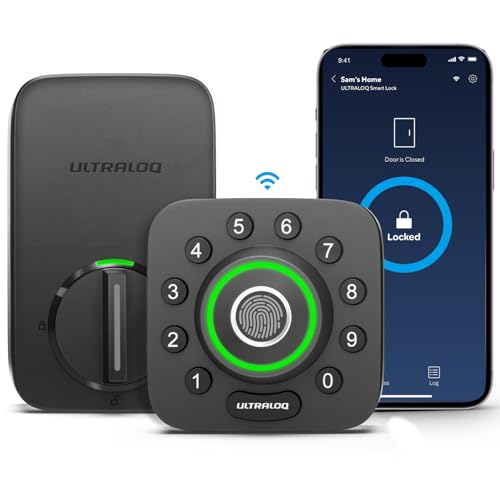 | Advanced Security Leader | Unlock Methods: Fingerprint, keypad, app, voice control, mechanical keys, eKey sharing | Remote Access Control: Built-in Wi-Fi via U Home app | Voice Control Compatible: Alexa and Google Assistant | CHECK ON AMAZON | Read Our Analysis |
More Details on Our Top Picks
TEEHO TE001 Keyless Entry Smart Deadbolt Lock
Want a straightforward smart lock that doesn’t require a smartphone or complex setup? The TEEHO TE001 delivers exactly that. You’ll appreciate its keypad-based access system, which lets you create 20 family codes plus temporary one-time codes for guests. The satin nickel deadbolt installs in minutes and features sturdy aluminum alloy construction with IP54 weather resistance. You can customize auto-lock timing from 10–99 seconds, and the anti-peeping protection keeps your codes safe. Its solid lock cylinder works only with 2-1/8″ door holes. Low battery indicators alert you proactively, while 24/7 email support and a one-year warranty provide peace of mind.
- Unlock Methods:Passcode entry, physical keys, auto-lock
- Remote Access Control:None (local keypad/key only)
- Voice Control Compatible:No
- Installation Difficulty:Minutes with screwdriver
- Weather Resistance Rating:IP54
- Access Code Capacity:20 passcodes
- Additional Feature:One-touch auto-lock feature
- Additional Feature:Anti-peeping code protection
- Additional Feature:Includes 2 physical keys
eufy Security Smart Lock C220 Fingerprint Keyless Entry
If you’re looking for a smart deadbolt that combines multiple unlock methods with minimal setup hassle, the eufy Security Smart Lock C220 delivers. You’ll unlock via fingerprint in under 1.5 seconds, the eufy app, keypad, physical key, Apple Watch, or voice commands through Alexa and Google Assistant. Its self-learning AI fingerprint recognition improves accuracy over time, reducing frustrating retries. The built-in Wi-Fi lets you control access remotely without a bridge, while integration with eufy’s ecosystem enables seamless routines and notifications. Installation takes just 15 minutes on most US/Canadian deadbolts without drilling. With eight AA batteries lasting roughly eight months and IP53 weatherproofing for temperatures between -22℉ and 158℉, you’re getting reliable, convenient home security.
- Unlock Methods:Fingerprint, app, keypad, physical key, Apple Watch, voice control
- Remote Access Control:Built-in Wi-Fi via eufy app
- Voice Control Compatible:Alexa and Google Assistant
- Installation Difficulty:15 minutes, no drilling required
- Weather Resistance Rating:IP53
- Access Code Capacity:Not specified
- Additional Feature:Self-learning fingerprint AI
- Additional Feature:8-month battery life
- Additional Feature:Apple Watch unlock compatible
Philips Wi-Fi Smart Door Lock with Fingerprint & App Control
The Philips Wi-Fi Smart Door Lock stands out for families and frequent travelers who need flexible, remote access without installing a separate hub. You’ll appreciate the multiple unlock methods: fingerprints, passcodes, app control, physical keys, and voice commands via Alexa or Google Assistant. Store unlimited fingerprints for family members and create up to 100 custom passcodes. The built-in Wi-Fi enables remote lock/unlock from anywhere, while Away Mode disables all methods except your master code for added security. Auto-lock functionality activates within 10–180 seconds, and you’ll receive real-time notifications tracking all access activity. Installation’s straightforward with just a screwdriver on compatible doors.
- Unlock Methods:App, passcode, fingerprint, physical key, voice control
- Remote Access Control:Built-in Wi-Fi via smartphone app
- Voice Control Compatible:Alexa and Google Assistant
- Installation Difficulty:Minutes with screwdriver
- Weather Resistance Rating:Not specified
- Access Code Capacity:Up to 100 custom passcodes
- Additional Feature:Up to 100 custom passcodes
- Additional Feature:Unlimited scheduled guest codes
- Additional Feature:Away Mode security feature
Schlage Encode Smart WiFi Deadbolt Lock with Keyless Entry
Need remote access to your front door from anywhere? The Schlage Encode Smart WiFi Deadbolt delivers. You’ll control and monitor your lock through the Schlage Home app, integrating seamlessly with Alexa and Google Home. Managing up to 100 access codes makes guest management effortless, especially with Airbnb integration that automatically generates temporary codes. The touchscreen exterior lets you lock with one touch, while customizable alarms alert you to forced entry attempts. Installation takes minutes—no hardwiring required. The fingerprint-resistant design maintains durability, and you’ll appreciate the auto-lock feature with adjustable time delays for added convenience and security.
- Unlock Methods:App, touchscreen passcode, voice control, physical key
- Remote Access Control:Built-in Wi-Fi via Schlage Home app
- Voice Control Compatible:Alexa and Google Home
- Installation Difficulty:Minutes with screwdriver
- Weather Resistance Rating:Not specified
- Access Code Capacity:Up to 100 access codes
- Additional Feature:Airbnb integration for guests
- Additional Feature:Customizable forced entry alarm
- Additional Feature:Fingerprint-resistant touchscreen exterior
ULTRALOQ U-Bolt Pro WiFi Smart Lock with Door Sensor
Looking for fingerprint recognition combined with traditional keypad access? The ULTRALOQ U-Bolt Pro WiFi Smart Lock delivers both, plus remote smartphone control and voice compatibility with Alexa and Google Home. You’ll appreciate the auto-lock feature when you’re hands full and auto-unlock as you approach your door. The built-in door sensor alerts you to unlocks and open doors with exact timestamps. Installation takes just ten minutes—no hub required. You’re covered by an 18-month electronic guarantee and lifetime mechanical warranty. With ANSI Grade 1 durability and IP65 weatherproofing, this lock withstands the elements while offering enterprise-level security.
- Unlock Methods:Fingerprint, keypad, app, voice control, mechanical keys, eKey sharing
- Remote Access Control:Built-in Wi-Fi via U Home app
- Voice Control Compatible:Alexa and Google Assistant
- Installation Difficulty:10 minutes with screwdriver
- Weather Resistance Rating:IP65
- Access Code Capacity:Not specified
- Additional Feature:Built-in door sensor included
- Additional Feature:ANSI Grade 1 certified
- Additional Feature:Remote eKey sharing capability
Factors to Consider When Choosing Smart Deadbolts
When you’re shopping for a smart deadbolt, you’ll want to evaluate how you’ll open it—whether that’s via smartphone app, keypad, biometric scanner, or traditional key—since your preferred method directly impacts convenience and security. You’ll also need to verify installation compatibility with your door and existing locks, then assess battery life, connectivity options, and whether remote access matters for your lifestyle. Finally, you shouldn’t overlook the lock’s security certifications, build quality, and durability ratings, as these features determine whether your investment truly protects your home.
Unlock Methods Available
How you’ll access your smart deadbolt matters just as much as the lock itself. You’ll want multiple unlock methods for convenience and security redundancy.
Biometric fingerprint recognition offers fast, keyless entry with self-learning AI that improves accuracy over time. Keypads let you create dozens of custom codes for family and guests, plus temporary access windows for visitors. Mobile apps enable remote unlocking from anywhere, whether your lock uses built-in Wi-Fi or a hub-free connection.
Voice control through Amazon Alexa or Google Assistant adds hands-free convenience for quick entry. Physical keys remain essential backups during technology failures. The best smart deadbolts combine several of these methods, giving you flexibility while maintaining security across different situations.
Installation and Compatibility
Installation and compatibility are make-or-break factors that determine whether your smart deadbolt will actually work on your door. You’ll need to verify your door’s hole size—most models require standard 2-1/8″ (54mm) holes—and confirm thickness compatibility, typically between 1-3/8″ to 2″. Check whether installation demands only a screwdriver or requires additional drilling and prep work. Confirm the lock’s handedness matches your door’s swing direction. You should also verify that the unit supports your specific door type and fits standard US/CA deadbolt specifications. Finally, determine if you need a hub for connectivity or if the lock includes built-in Wi-Fi, and decide between battery-powered or hardwired options based on your electrical setup.
Battery Life and Power
Battery life is a critical consideration that directly impacts the convenience and reliability of your smart deadbolt. Most models use standard AA batteries and typically operate for 8 months under normal usage, though this varies by model and features you activate.
Connected features like Wi-Fi, auto-unlock, real-time notifications, and continuous sensing drain power faster, potentially shortening battery duration substantially. If you prioritize constant connectivity and instant alerts, expect more frequent replacements.
Fortunately, most smart deadbolts alert you with low-battery indicators before lockouts occur, and many companion apps let you monitor battery levels remotely. Consider your lifestyle: if you want minimal maintenance, choose models with longer battery spans and fewer always-on features.
Connectivity and Remote Access
When you’re away from home, can you really trust your deadbolt? Built-in Wi-Fi connectivity lets you lock and unlock remotely via smartphone without needing a separate hub. You’ll receive real-time notifications and access history, giving you complete visibility into who enters your home and when.
Check compatibility carefully—some locks work only with 2.4 GHz networks or specific voice assistants like Alexa or Google Assistant. If you rent out your property, consider models integrated with platforms like Airbnb, which automate guest access without manual code sharing.
Look for locks that integrate with your existing smart home ecosystem, enabling seamless automation and control alongside other devices. This connectivity transforms your deadbolt from a standalone security tool into part of your comprehensive home management system.
Security Features and Durability
Your smart deadbolt’s security is only as strong as its physical construction and digital defenses. You’ll want to prioritize models featuring hardened metal alloys and anti-peeping technology that resists code guessing attacks. Check IP ratings like IP54, IP65, or IP53 to ensure your lock withstands dust, moisture, and harsh weather conditions.
Look for robust deadbolt mechanisms with auto-lock capabilities that resist forced entry attempts. Verify encrypted communications and secure local or remote access options to prevent hacking and spoofing vulnerabilities.
You should also demand fail-safe indicators, including low battery and tamper alerts that notify you immediately of suspicious activity. Comprehensive activity logs allow you to monitor access attempts and identify unauthorized entries, giving you complete peace of mind about your home’s security.
Warranty and Support Options
What happens when your smart deadbolt fails months after purchase? You’ll want comprehensive warranty coverage. Most manufacturers offer warranties ranging from one to eighteen months for electronic components, though some provide lifetime hardware support.
When evaluating options, consider the support channels available to you. Many brands offer 24/7 email support, weekly business hours for phone assistance, or live chat options. Some even extend coverage to weekends and after-hours emergencies.
Look beyond basic warranties. Extended protection plans often bundle mechanical and electronic components, providing robust peace of mind. Certain brands include proactive replacement policies—offering eighteen months of professional assistance or lifetime service related to hardware defects.
Match the warranty terms to your device’s price point. Higher-end models typically justify extended coverage, ensuring you’re protected throughout your smart deadbolt’s lifespan.
Frequently Asked Questions
What Is the Average Battery Life of Smart Deadbolts Before Requiring Replacement?
You’ll typically find that most smart deadbolts last between 6 to 12 months on a single battery set before you’ll need to replace them. However, some premium models can stretch up to 2 years if you’re not using them constantly.
Are Smart Deadbolts Compatible With Existing Door Frames and Hardware?
You’ll find that most smart deadbolts fit your existing door frames without modifications. They’re designed to replace standard deadbolts, so you won’t need new hardware. However, you should verify your door’s thickness and bolt type before purchasing to ensure compatibility.
Do Smart Deadbolts Work During Internet Outages or Power Failures?
You’ll find that most smart deadbolts operate independently during internet outages because they’ve got built-in backup power systems and mechanical locks. However, you won’t access remote features without connectivity, though you can still open them manually or with a keypad code.
How Secure Are Smart Deadbolts Against Hacking and Cyber Attacks?
You’ll find that modern smart deadbolts employ strong encryption and multi-factor authentication to protect against hacking. They’re regularly updated with security patches, though you shouldn’t rely solely on them—combine them with other home security measures for maximum protection.
What Is the Typical Installation Time for Smart Deadbolts by Professionals?
You’ll typically find that professional installers can set up your smart deadbolt in 30 to 60 minutes. They’ll remove your old lock, prepare the door, install the new mechanism, and test everything to ensure it’s working perfectly.



