
You’re likely juggling multiple smart devices across your home—each requiring its own app, its own connection, its own headaches. What if you could consolidate that chaos into one unified hub? The right control center doesn’t just simplify your setup; it future-proofs your investment. But with so many options flooding the 2026 market, how do you know which hub actually delivers on its promises?
| CHAMBERLAIN Smart Garage Control Hub with WiFi & Bluetooth |  | Garage Door Specialist | Primary Control Method: Smartphone app (myQ) | Voice Assistant Compatibility: Amazon Alexa only | WiFi Requirements: 2.4 GHz (802.11 B/G/N), 50 feet range | CHECK ON AMAZON | Read Our Analysis |
| BroadLink RM4 Pro Smart Home Hub WiFi Blaster |  | Most Versatile Hub | Primary Control Method: Smartphone app + voice control | Voice Assistant Compatibility: Alexa, Google Assistant, IFTTT, Siri (iPhone) | WiFi Requirements: 2.4 GHz only (no 5 GHz or mesh) | CHECK ON AMAZON | Read Our Analysis |
| SofaBaton X1S Universal Remote Control with Hub |  | Premium Universal Remote | Primary Control Method: Universal remote + voice control | Voice Assistant Compatibility: Alexa, Google Assistant | WiFi Requirements: Not specified | CHECK ON AMAZON | Read Our Analysis |
| Aeotec Smart Home Hub2 Matter Gateway Alexa Compatible |  | Best Smart Home Gateway | Primary Control Method: Smartphone app (SmartThings) + voice control | Voice Assistant Compatibility: Alexa, Google Assistant | WiFi Requirements: WiFi or Ethernet connection | CHECK ON AMAZON | Read Our Analysis |
| BroadLink RM4 Pro Universal IR Remote Control Hub | 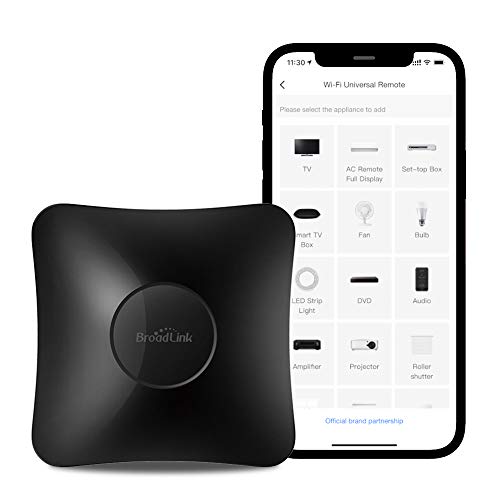 | Best Overall Hub | Primary Control Method: Smartphone app (BroadLink) + voice control | Voice Assistant Compatibility: Alexa, Google Home, IFTTT | WiFi Requirements: 2.4 GHz only (no 5 GHz) | CHECK ON AMAZON | Read Our Analysis |
| Broadlink RM MAX Smart Home Hub Universal Remote |  | Budget-Friendly Pick | Primary Control Method: Smartphone app (Magic Home) + voice control | Voice Assistant Compatibility: Alexa, Google Home | WiFi Requirements: 2.4 GHz WiFi (voice/remote access) | CHECK ON AMAZON | Read Our Analysis |
| BroadLink RM4mini Smart Remote Hub WiFi IR Blaster |  | IR-Only Essential | Primary Control Method: Smartphone app (BroadLink) + voice control | Voice Assistant Compatibility: Alexa, Google Assistant, IFTTT, Siri (iPhone) | WiFi Requirements: 2.4 GHz only (no 5 GHz or mesh) | CHECK ON AMAZON | Read Our Analysis |
| MOES WiFi Smart IR Remote Controller for Home Devices |  | Budget IR Blaster | Primary Control Method: Smartphone app (Smart Life/Tuya) + voice control | Voice Assistant Compatibility: Alexa, Google Assistant | WiFi Requirements: 2.4G WiFi only | CHECK ON AMAZON | Read Our Analysis |
| BroadLink RM4 Mini IR Universal Remote Control |  | Best Value IR | Primary Control Method: Smartphone app (BroadLink) + voice control | Voice Assistant Compatibility: Alexa, Google Home, IFTTT | WiFi Requirements: 2.4 GHz only (no 5 GHz) | CHECK ON AMAZON | Read Our Analysis |
| Broadlink RM4 Pro Smart IR/RF Remote Control Hub |  | Most Advanced Control | Primary Control Method: Smartphone app (BroadLink) + voice control | Voice Assistant Compatibility: Alexa, Google Assistant, IFTTT, Siri | WiFi Requirements: 2.4 GHz only (no 5 GHz or mesh) | CHECK ON AMAZON | Read Our Analysis |
More Details on Our Top Picks
CHAMBERLAIN Smart Garage Control Hub with WiFi & Bluetooth
If you’re looking to control your garage door remotely without replacing your existing opener, the CHAMBERLAIN Smart Garage Control Hub is your best bet. This wireless hub works with most garage door openers manufactured after 1993, letting you open or close your door from anywhere via the free myQ app. You’ll appreciate features like access sharing, close scheduling, and Amazon Key In-Garage Delivery integration. Setup’s simple with Bluetooth connectivity, and you’ll need a 2.4 GHz Wi-Fi router within 50 feet. Control multiple doors by purchasing additional sensors separately. Just verify compatibility—it won’t work with certain Chamberlain or Linear models.
- Primary Control Method:Smartphone app (myQ)
- Voice Assistant Compatibility:Amazon Alexa only
- WiFi Requirements:2.4 GHz (802.11 B/G/N), 50 feet range
- Device Compatibility Scope:Garage door openers (post-1993, sectional doors)
- Automation & Scheduling:Door close scheduling
- Remote Access Capability:Control/view status from anywhere
- Additional Feature:Amazon Key In-Garage Delivery
- Additional Feature:Second door control option
- Additional Feature:Sectional door requirement only
BroadLink RM4 Pro Smart Home Hub WiFi Blaster
The BroadLink RM4 Pro excels for anyone seeking to consolidate control of infrared and RF devices across their home. This WiFi blaster manages over 50,000 IR devices—TVs, air conditioners, soundbars—plus RF-controlled curtains and shades via its 433MHz fixed-code receiver. You’ll control everything through the free BroadLink app or voice commands with Alexa, Google Assistant, and Siri. Create custom automations and scenes for seamless routines. Setup requires 2.4GHz WiFi with passwords under 32 characters and no special characters. Note that IR signals can’t penetrate obstacles, and some ceiling fans remain unsupported. Contact support before purchasing if you’re uncertain about device compatibility.
- Primary Control Method:Smartphone app + voice control
- Voice Assistant Compatibility:Alexa, Google Assistant, IFTTT, Siri (iPhone)
- WiFi Requirements:2.4 GHz only (no 5 GHz or mesh)
- Device Compatibility Scope:IR devices (50,000+), RF (433MHz fixed code)
- Automation & Scheduling:Custom scenes, timers, automations
- Remote Access Capability:Remote control from home or away
- Additional Feature:50,000+ IR device library
- Additional Feature:433MHz RF fixed code
- Additional Feature:Manual IR learning capability
SofaBaton X1S Universal Remote Control with Hub
Looking to consolidate your smart home control into one intuitive device? The SofaBaton X1S combines a universal remote with a powerful hub, offering comprehensive control over 500,000+ device models. You’ll create custom activities—like “Watch TV”—that power on multiple devices and adjust settings with a single tap. The hub’s dual IR blasters ensure 360-degree coverage, even in tricky spots. Voice commands work seamlessly with Alexa and Google Assistant. With a backlit design, Raise-to-Wake functionality, and 45-day battery life, you’ll enjoy reliable, hands-free control throughout your home.
- Primary Control Method:Universal remote + voice control
- Voice Assistant Compatibility:Alexa, Google Assistant
- WiFi Requirements:Not specified
- Device Compatibility Scope:6,000+ brands, 500,000+ device models
- Automation & Scheduling:Custom activities, macros, IFTTT/Shortcuts integration
- Remote Access Capability:Remote control from home or away
- Additional Feature:6,000+ brands supported
- Additional Feature:360-degree dual IR blasters
- Additional Feature:45-day battery life
Aeotec Smart Home Hub2 Matter Gateway Alexa Compatible
Want a hub that works seamlessly across multiple smart home ecosystems? The Aeotec Smart Home Hub2 does exactly that. This Matter gateway and Zigbee hub functions as a SmartThings hub, supporting thousands of compatible devices including lights, sensors, plugs, switches, and thermostats. You’ll control everything through the SmartThings app while enjoying voice commands via Alexa or Google Assistant. Setup’s straightforward with Wi-Fi or Ethernet connectivity. What’s particularly valuable is local automation—your routines continue running even if your internet drops. However, note that Z-Wave devices aren’t supported, so verify your existing smart home devices’ compatibility before committing.
- Primary Control Method:Smartphone app (SmartThings) + voice control
- Voice Assistant Compatibility:Alexa, Google Assistant
- WiFi Requirements:WiFi or Ethernet connection
- Device Compatibility Scope:Matter, Zigbee devices (thousands compatible)
- Automation & Scheduling:Custom routines, local automations (offline capable)
- Remote Access Capability:Remote monitoring & automation via app
- Additional Feature:Matter standard gateway support
- Additional Feature:Zigbee hub functionality
- Additional Feature:Local offline automations
BroadLink RM4 Pro Universal IR Remote Control Hub
If you’re drowning in remote controls and crave a unified way to manage your TV, air conditioner, set-top box, and other IR-enabled devices, BroadLink’s RM4 Pro delivers exactly that. This universal hub controls 50,000+ devices through its expansive IR library while supporting RF 433MHz for motorized curtains and smart lights. You’ll enjoy seamless integration with Alexa and Google Home, plus IFTTT automation. The app simplifies setup with FastCon technology and cloud-updated device compatibility. Just remember it requires 2.4 GHz Wi-Fi only—not 5 GHz. With a stellar 4.1/5-star rating from nearly 5,000 reviews and one-year warranty, it’s an affordable solution for consolidating your smart home controls.
- Primary Control Method:Smartphone app (BroadLink) + voice control
- Voice Assistant Compatibility:Alexa, Google Home, IFTTT
- WiFi Requirements:2.4 GHz only (no 5 GHz)
- Device Compatibility Scope:IR devices (50,000+), RF (433MHz)
- Automation & Scheduling:Scene creation, timers, automations, cloud updates
- Remote Access Capability:Remote control via app (external network access)
- Additional Feature:Cloud-updated device library
- Additional Feature:FastCon auto-discovery technology
- Additional Feature:24/7 technical support
Broadlink RM MAX Smart Home Hub Universal Remote
The Broadlink RM MAX shines for those managing a fragmented ecosystem of IR and RF devices without wanting to replace them all at once. You’ll control TVs, air conditioners, audio systems, fans, and roller blinds through a single hub using IR and RF protocols. The device integrates with Alexa and Google Home for voice commands, though you’ll need to create custom scenes for learning-mode buttons. After initial Wi-Fi setup, you can operate locally via Bluetooth for offline reliability. You’ll also manage FastCon smart bulbs and sensors through the upgraded Broadlink Magic Home app, automating routines like “Good Morning” without internet dependency.
- Primary Control Method:Smartphone app (Magic Home) + voice control
- Voice Assistant Compatibility:Alexa, Google Home
- WiFi Requirements:2.4 GHz WiFi (voice/remote access)
- Device Compatibility Scope:IR (38KHz), RF (433MHz) devices
- Automation & Scheduling:Preset scenes (Good Morning, Bedtime), offline operation
- Remote Access Capability:Remote control after WiFi setup
- Additional Feature:Offline scene operation capability
- Additional Feature:BLE local control support
- Additional Feature:FastCon ecosystem integration
BroadLink RM4mini Smart Remote Hub WiFi IR Blaster
Control 50,000+ infrared devices from your smartphone with the BroadLink RM4mini, making it an ideal choice if you’re looking to consolidate multiple remotes into a single smart hub. You’ll need a secure 2.4GHz Wi-Fi network and direct line-of-sight between the hub and your devices. The BroadLink App lets you create custom scenes, set timers, and automate routines like triggering your AC when room temperature rises. Voice control works with Alexa, Google Assistant, and Siri. However, this hub only controls IR devices—not RF remotes—and requires a Wi-Fi password without special characters. If your setup includes RF devices, consider the RM4 Pro instead.
- Primary Control Method:Smartphone app (BroadLink) + voice control
- Voice Assistant Compatibility:Alexa, Google Assistant, IFTTT, Siri (iPhone)
- WiFi Requirements:2.4 GHz only (no 5 GHz or mesh)
- Device Compatibility Scope:IR devices (50,000+) only
- Automation & Scheduling:Multiple timers, customized scenes
- Remote Access Capability:Remote control IR devices from anywhere
- Additional Feature:50,000+ IR device support
- Additional Feature:Temperature/humidity sensor cable
- Additional Feature:Optional IR learning function
MOES WiFi Smart IR Remote Controller for Home Devices
Want to consolidate your home’s scattered remotes into one unified system? The MOES WiFi Smart IR Remote Controller offers an affordable all-in-one solution for controlling AC units, TVs, fans, DVDs, and more through your smartphone. You’ll enjoy seamless integration with Alexa and Google Assistant for voice commands, plus a convenient learning function that copies commands from your original remotes when brands aren’t pre-loaded. Setup’s straightforward—just plug it in via USB or wall socket. Remember, it only supports IR signals at 38kHz and won’t transmit through walls, so position it in your target room for optimal performance.
- Primary Control Method:Smartphone app (Smart Life/Tuya) + voice control
- Voice Assistant Compatibility:Alexa, Google Assistant
- WiFi Requirements:2.4G WiFi only
- Device Compatibility Scope:IR devices (38kHz) only
- Automation & Scheduling:DIY learning function, device-specific automation
- Remote Access Capability:Remote control via app anytime, anywhere
- Additional Feature:DIY copy/learning function
- Additional Feature:UL certified adapter included
- Additional Feature:Single-room setup recommended
BroadLink RM4 Mini IR Universal Remote Control
If you’re drowning in remotes and need to consolidate control over 50,000+ IR-enabled devices—from your TV and air conditioner to your DVD player—BroadLink’s RM4 Mini delivers that unified command center. You’ll appreciate its straightforward setup via FastCon technology and compatibility with Alexa and Google Home for voice control. The device requires only 2.4 GHz Wi-Fi and keeps your supported devices library current through cloud updates. You can even add an external temperature and humidity sensor for enhanced automation. With one-year warranty coverage and round-the-clock technical support, you’re backed by reliable infrastructure.
- Primary Control Method:Smartphone app (BroadLink) + voice control
- Voice Assistant Compatibility:Alexa, Google Home, IFTTT
- WiFi Requirements:2.4 GHz only (no 5 GHz)
- Device Compatibility Scope:IR devices (50,000+) only
- Automation & Scheduling:Multiple timers, customized scenes, temperature-based triggers
- Remote Access Capability:Remote control IR devices from anywhere
- Additional Feature:Cloud-supported library updates
- Additional Feature:Temperature/humidity sensor compatible
- Additional Feature:FastCon auto-discovery technology
Broadlink RM4 Pro Smart IR/RF Remote Control Hub
The Broadlink RM4 Pro excels for anyone seeking to consolidate control of legacy devices—your TV, air conditioner, motorized blinds, and more—into a single smart hub. It handles both IR and RF signals, covering 38kHz devices and 433MHz fixed-code equipment. You’ll appreciate seamless integration with Alexa and Google Assistant for voice control, plus IFTTT support extending to Apple Siri. The companion app lets you automate scenes, set temperature-based triggers, and schedule devices remotely. Just remember: you’ll need a 2.4GHz Wi-Fi connection and a 5V USB adapter. Before purchasing, verify your specific RF devices’ compatibility with 433MHz fixed codes.
- Primary Control Method:Smartphone app (BroadLink) + voice control
- Voice Assistant Compatibility:Alexa, Google Assistant, IFTTT, Siri
- WiFi Requirements:2.4 GHz only (no 5 GHz or mesh)
- Device Compatibility Scope:IR devices (38kHz), RF (433MHz fixed code)
- Automation & Scheduling:Timers, scenes, routines, temperature/humidity-based triggers
- Remote Access Capability:Remote control from anywhere via app
- Additional Feature:External temperature/humidity sensors
- Additional Feature:RF motorized curtain control
- Additional Feature:Scene-based automation triggers
Factors to Consider When Choosing Smart Hubs (Universal)
When you’re shopping for a smart hub, you’ll need to evaluate how well it supports your existing devices and whether its WiFi capabilities match your home network setup. Voice assistant integration and IR/RF control support matter too—especially if you’re relying on the hub to command legacy appliances alongside modern smart devices. These factors determine whether a hub truly unifies your setup or leaves you juggling multiple remotes and apps.
Factors to Consider When Choosing Smart Hubs (Universal)
Selecting the right universal smart hub requires you to evaluate several critical specifications that’ll determine whether it works with your existing devices and supports your automation goals. First, verify IR and RF compatibility—RF typically uses fixed codes rather than rolling codes in many hubs. Next, confirm 2.4 GHz Wi-Fi support, as most hubs rely on this frequency for setup and cloud connectivity, not 5 GHz. Check whether your hub integrates with Alexa, Google Assistant, or IFTTT, and assess whether it offers local automations or Matter/Zigbee support. Examine learning capabilities for devices outside the built library, plus custom scene programming. Finally, review power requirements, connectivity options like Ethernet, and whether your hub functions offline for essential automations.
Device Compatibility Range
Beyond these core specifications, you’ll want to examine which devices your hub can actually control—and this compatibility range often determines whether you’re investing in a versatile control center or a limited solution. Most IR hubs support 38kHz devices and rely on cloud libraries or learning modes to recognize new models, though line-of-sight limitations can block signals. RF support typically handles fixed-code 433MHz devices, excluding rolling-code systems that many modern motors use. Dual-mode hubs combining IR and RF functionality expand your options considerably, covering everything from televisions and air conditioners to motorized blinds and projectors. Before purchasing, verify device-specific limitations—certain curtain motors or ceiling fans may fall outside your hub’s capabilities, requiring advance research.
WiFi Requirements and Setup
How compatible is your home network with your chosen hub? Most smart hubs require a 2.4 GHz Wi-Fi network for setup and operation, so you’ll want to verify your router supports this frequency. Many hubs don’t work with 5 GHz networks, and some older ecosystems lack mesh network compatibility.
During setup, stick to standard WPA/WPA2 security protocols and avoid special characters or overly long passwords, which can cause pairing failures. You’ll need a stable 2.4 GHz connection within approximately 50 feet of your hub for reliable device pairing and control.
Additionally, cloud-based features require consistent internet access for initial device recognition and ongoing software updates. Before purchasing, confirm your network meets these requirements to ensure seamless operation.
Voice Assistant Integration
Once you’ve confirmed your network setup, you’ll want to evaluate how your hub integrates with voice assistants. Most hubs support Alexa and Google Assistant, enabling hands-free control of compatible devices and scenes. If you’re invested in Apple’s ecosystem, you’ll need to check whether your hub offers native Siri support or relies on IFTTT workarounds.
Compatibility isn’t universal—some devices require integration through partner ecosystems or specific skills to enable voice activation. You’ll typically need to link accounts and enable services within both your hub’s and assistant’s apps.
Consider how local automations affect performance. Offline functionality can reduce latency for voice-initiated actions, improving reliability during connectivity issues. Evaluate whether your hub’s voice capabilities align with your device ecosystem before committing.
IR and RF Control Support
What if your smart hub could control devices beyond internet-connected gadgets? You’ll find that IR and RF support expands your control options dramatically.
IR control covers 38kHz carriers, supporting thousands of devices like TVs, set-top boxes, and AC units through cloud libraries with 50,000+ listings. However, IR requires line-of-sight functionality.
RF control typically operates on 433MHz fixed-code signaling, perfect for motorized blinds and certain devices but unsuitable for rolling-code remotes. Range limitations and wall obstruction may affect performance.
Some hubs combine both technologies, letting you control IR-only devices alongside RF-operated equipment. When cloud databases lack your device, learning or manual programming fills gaps, allowing you to replicate uncommon remotes and unlock fuller home automation potential.
Automation and Customization Options
Imagine controlling multiple devices simultaneously with a single command—that’s where automation and customization truly shine. You’ll want a hub that supports scenes and routines, like “Watch TV” or “Good Morning,” executing complex sequences effortlessly. Look for local scene storage, which keeps automations running offline during internet outages—a crucial reliability factor. Higher-end hubs offer richer customization through one-click activities, macros, and virtual buttons. You can integrate with IFTTT or shortcuts for expanded functionality. Verify the hub supports both IR and RF devices for comprehensive control. Rapid scene execution matters too, especially if you’re managing multiple rooms. Ensure your chosen hub preserves local automations during network disruptions, giving you uninterrupted smart home control.
Frequently Asked Questions
Can Smart Hubs Work With Older Non-Wifi Devices and Appliances?
You’ll need adapters or bridges to connect older non-WiFi devices to smart hubs. You can use wireless plugs, smart switches, or specialized converters that translate signals between your legacy appliances and your hub’s network system.
What’s the Typical Installation Time for Setting up a New Smart Hub?
You’ll typically spend 15-30 minutes setting up a new smart hub. You’ll download the app, connect it to your Wi-Fi, create an account, and pair your devices. Most modern hubs guide you through setup automatically, making the process straightforward and hassle-free.
Do Smart Hubs Require a Subscription Fee or Ongoing Monthly Costs?
You’ll find that most smart hubs don’t require subscription fees for basic functionality. However, you may need paid subscriptions for advanced features, cloud storage, or premium integrations with certain third-party services and devices.
How Secure Are Smart Hubs Against Hacking and Unauthorized Access?
You’ll find that modern smart hubs employ encryption, regular security updates, and two-factor authentication to protect your devices. However, you’re responsible for maintaining strong passwords and keeping firmware updated to maximize your hub’s security against potential breaches.
Which Smart Hub Offers the Best Battery Backup During Power Outages?
You’ll find that Samsung SmartThings Hub offers the best battery backup during power outages, providing up to 10 hours of continuous operation. This ensures you’ll maintain critical smart home functions and security features when your power goes down unexpectedly.



