

You’re probably drowning in tangled cables, misplaced inventory, and unmarked storage bins. Smart label makers can transform your chaos into organized systems without messy ink or complicated setups. But which model’s right for your needs? The difference between a $30 device and a $200 investment comes down to features you’ll actually use.
| Phomemo D30 Portable Bluetooth Label Printer Machine |  | Best Overall | Printing Technology: Inkless thermal (German print head) | Connectivity: Bluetooth wireless | Portability: Palm-sized, pocket-friendly, rechargeable battery | CHECK ON AMAZON | Read More |
| Nelko P21 Bluetooth Label Printer Machine with Tape | 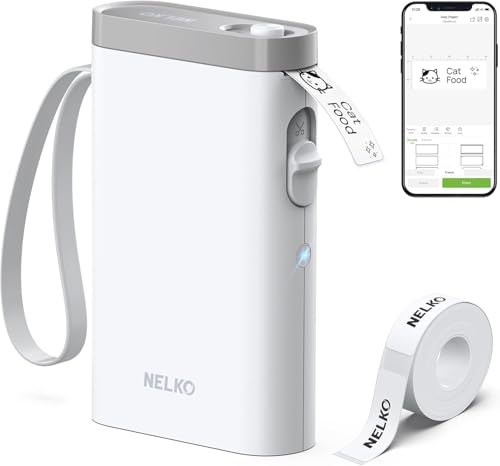 | Best Value | Printing Technology: Direct thermal (203 DPI, BPA-free) | Connectivity: Bluetooth wireless (iOS & Android) | Portability: Compact, lightweight, new 2025 version | CHECK ON AMAZON | Read More |
| Seiko Instruments Smart Monochrome Label Printer 620 |  | Professional Desktop Grade | Printing Technology: Direct thermal | Connectivity: USB (PC/Mac) | Portability: Desktop (not portable) | CHECK ON AMAZON | Read More |
| Seiko Smart Label Printer 620 (2.28″ Labels) | | Best For Shipping | Printing Technology: Direct thermal | Connectivity: USB (PC/Mac) | Portability: Desktop (not portable) | CHECK ON AMAZON | Read More |
| DYMO LabelManager 160 Portable Label Maker Bundle |  | Most User-Friendly | Printing Technology: Direct thermal | Connectivity: Battery-powered (standalone) | Portability: Compact and portable | CHECK ON AMAZON | Read More |
| Label Maker Machine M100 with 4000 Icons |  | Best For Small Business | Printing Technology: Direct thermal (203 DPI, 30 mm/s) | Connectivity: Bluetooth + USB connectivity | Portability: Portable (5 x 3.6 x 2.4 inches, 9.9 oz) | CHECK ON AMAZON | Read More |
| Seiko Smart Label Printer 650 USB |  | Fastest Print Speed | Printing Technology: Direct thermal (300 DPI, 3.94 in/s) | Connectivity: USB (PC/Mac) | Portability: Desktop (not portable) | CHECK ON AMAZON | Read More |
More Details on Our Top Picks
Phomemo D30 Portable Bluetooth Label Printer Machine
Looking for a label maker that won’t drain your wallet with constant ink cartridge replacements? The Phomemo D30 delivers inkless thermal printing that eliminates ongoing supply costs. This palm-sized Bluetooth printer fits your pocket while packing impressive features: a German thermal print head for crisp output, 1000+ AI-powered templates, and support for barcodes and QR codes. You’ll handle both continuous and pre-cut tapes, import Excel data, and even use voice recognition through the intuitive app. Its rechargeable battery enables cable-free printing anywhere. Whether you’re organizing at home, managing a small business, or labeling storage boxes, the D30 combines portability with professional functionality at an accessible price point.
- Printing Technology:Inkless thermal (German print head)
- Connectivity:Bluetooth wireless
- Portability:Palm-sized, pocket-friendly, rechargeable battery
- Label Output Color:Black text (color requires patterned tapes)
- Design Customization:1000+ symbols, 60+ frames, AI templates, barcodes, QR codes
- Primary Use Case:Home, school, office, small business organization
- Additional Feature:German thermal print head technology
- Additional Feature:1000+ AI-powered symbols/templates
- Additional Feature:Voice recognition and OCR capability
Nelko P21 Bluetooth Label Printer Machine with Tape
Want a label maker that fits in your pocket without compromising functionality? The Nelko P21 delivers exactly that. This 2025 model weighs half what traditional label makers do, making it ideal for home, school, and office organization. It uses Direct Thermal technology at 203 DPI, printing crisp black text without ink or toner. You’ll download the Nelko app, connect via Bluetooth, and access 90+ fonts across 10+ languages. Create labels with text, QR codes, barcodes, and images. Fixed label sizes range from 12x40mm to 14x75mm. The rechargeable battery ensures extended use, while the app’s diverse templates let you organize everything from cosmetics to office supplies instantly.
- Printing Technology:Direct thermal (203 DPI, BPA-free)
- Connectivity:Bluetooth wireless (iOS & Android)
- Portability:Compact, lightweight, new 2025 version
- Label Output Color:Monochrome black (color requires patterned tapes)
- Design Customization:450+ materials, 90+ fonts, templates, barcodes, QR codes
- Primary Use Case:Home, school, office organization
- Additional Feature:203 DPI high-definition printing
- Additional Feature:90+ fonts, 10+ languages
- Additional Feature:Half weight/size vs traditional
Seiko Instruments Smart Monochrome Label Printer 620
Need a compact printer that won’t clutter your workspace? The Seiko Instruments Smart Monochrome Label Printer 620 delivers exactly that. This sleek desktop printer uses direct thermal technology, eliminating messy ink, toner, and ribbons. You’ll print at an impressive 2.76 inches per second, handling address labels, shipping tags, file folders, name badges, and more. It’s USB-compatible with both PC and Mac, making setup straightforward. The intuitive software and versatile design make creating professional labels effortless. Plus, you’re backed by a reassuring 3-year warranty, ensuring your investment stays protected.
- Printing Technology:Direct thermal
- Connectivity:USB (PC/Mac)
- Portability:Desktop (not portable)
- Label Output Color:Monochrome
- Design Customization:Professional software included
- Primary Use Case:Desktop address, shipping, file folder labels
- Additional Feature:2.76 inches/second print speed
- Additional Feature:3-year warranty included
- Additional Feature:Sleek space-saving design
Seiko Smart Label Printer 620 (2.28″ Labels)
The Seiko Smart Label Printer 620 delivers the speed and simplicity you’ll want if you’re managing multiple labeling tasks without the complexity of enterprise-level equipment. This desktop printer handles 2.28″ labels at 2.76 inches per second, making quick work of address, shipping, file-folder, and name badge applications. You’ll appreciate the front-load design—just drop in a new roll when you’re ready to switch tasks. The included software lets you format and customize labels intuitively, while the compact 4.5″ x 6.9″ x 5.9″ footprint fits easily on any desk. Compatible with both PC and Mac, it’s an affordable solution for organizing your workspace efficiently.
- Printing Technology:Direct thermal
- Connectivity:USB (PC/Mac)
- Portability:Desktop (not portable)
- Label Output Color:Monochrome
- Design Customization:Intuitive software for formatting/customization
- Primary Use Case:Desktop address, shipping, file folder labels
- Additional Feature:2.76 inches/second print speed
- Additional Feature:Front-load easy label changes
- Additional Feature:4.5 x 6.9 x 5.9 dimensions
DYMO LabelManager 160 Portable Label Maker Bundle
If you’re juggling home and office organization without sacrificing portability, DYMO’s LabelManager 160 delivers professional-quality labels wherever you need them. You’ll appreciate the QWERTY keyboard and one-touch smart keys that streamline text input and editing. The large display makes navigation intuitive, while 20+ text formats and 200+ symbols let you customize labels to match your style. You can print on multiple tape widths—1/4, 3/8, or 1/2 inches—in various colors beyond the included white tape. Extended battery life and automatic power-off keep energy consumption minimal. The bundle includes three label cassettes, getting you started immediately. Use authentic DYMO tapes for optimal performance.
- Printing Technology:Direct thermal
- Connectivity:Battery-powered (standalone)
- Portability:Compact and portable
- Label Output Color:Black on white
- Design Customization:20+ text formats, 200+ symbols
- Primary Use Case:Home and office organization
- Additional Feature:QWERTY keyboard with smart keys
- Additional Feature:Three 12mm tape cassettes included
- Additional Feature:200+ customizable symbols
Label Maker Machine M100 with 4000 Icons
Looking for a compact label maker that doesn’t sacrifice functionality? The Ponek M100 delivers impressive capabilities in a pocket-sized design. You’ll access 4,000 icons, 300+ templates, and 400+ borders through the Print Master app on your smartphone or tablet. This direct thermal printer produces sharp 203 DPI labels without requiring ink or toner, printing at 30mm/s. The rechargeable battery powers it anywhere, while Bluetooth connectivity keeps everything seamless. With support for barcodes, QR codes, and media widths up to 2 inches, you’re equipped for everything from price tags to organization projects. At 9.9 ounces, it’s genuinely portable.
- Printing Technology:Direct thermal (203 DPI, 30 mm/s)
- Connectivity:Bluetooth + USB connectivity
- Portability:Portable (5 x 3.6 x 2.4 inches, 9.9 oz)
- Label Output Color:Monochrome black
- Design Customization:4000+ icons, 300+ templates, 400+ borders
- Primary Use Case:Small business, office, home, school industrial labeling
- Additional Feature:4000+ icons and templates
- Additional Feature:30 mm/s printing speed, 203 DPI
- Additional Feature:#4 ranked desktop label printer
Seiko Smart Label Printer 650 USB
Want a label maker that won’t clutter your workspace? The Seiko Smart Label Printer 650 USB delivers sleek design without sacrificing performance. This direct thermal printer produces professional-quality labels at 300 DPI and 3.94 inches per second—no ink or toner required. You’ll handle address labels, shipping tags, file folders, name badges, and more across both PC and Mac platforms. The USB connection ensures straightforward setup and reliable operation. With a robust 3-year warranty backing your investment, you’re getting dependable technology that streamlines your organization efforts while maintaining a compact footprint on your desk.
- Printing Technology:Direct thermal (300 DPI, 3.94 in/s)
- Connectivity:USB (PC/Mac)
- Portability:Desktop (not portable)
- Label Output Color:Monochrome
- Design Customization:Professional software included
- Primary Use Case:Desktop address, shipping, file folder labels
- Additional Feature:3.94 inches/second print speed
- Additional Feature:300 DPI resolution capability
- Additional Feature:3-year warranty included
Factors to Consider When Choosing Smart Label Makers
You’ll want to evaluate portability and connectivity options so you can print labels wherever you work, whether that’s your desk or on the go. Consider printing technology and print quality alongside design flexibility and customization features to ensure you’re getting crisp, professional results that match your organizational style. Don’t overlook battery life, power source, and media compatibility with various tape types, as these factors directly impact your label maker’s practicality and long-term value.
Portability and Connectivity Options
How much freedom do you need when labeling? Your answer determines which connectivity option suits you best. If you’re constantly on the move, you’ll want a palm-sized unit with a rechargeable battery pack—these enable labeling away from outlets without interruption. Bluetooth connectivity offers wireless printing directly from your phone, eliminating USB cable hassles. However, if you prefer a stable setup at your desk, USB or USB-C connections provide reliable direct computer printing. Keep in mind that many models require companion iOS or Android apps for accessing design templates, so factor in your device compatibility. Battery life becomes essential for extended labeling sessions, making built-in rechargeable packs essential for genuine portability and independence from power sources.
Printing Technology and Print Quality
Once you’ve secured the right connectivity and portability for your labeling needs, the printing mechanism itself becomes your next consideration. Direct thermal printing eliminates ink, toner, and ribbons—reducing maintenance while lowering long-term costs. You’ll find print speeds ranging from 2.76 to 3.94 inches per second, which affects how quickly you can produce multiple labels. Resolution matters too: 203 DPI handles standard text and barcodes adequately, while 300 DPI delivers sharper fonts and detailed codes for professional applications. Most models offer monochrome output, though color options exist through specialized tapes if you need vibrant labels. These technical specifications directly influence your label quality and workflow efficiency, so evaluate them against your specific organizational demands.
Design Flexibility and Customization
What truly separates capable label makers from exceptional ones is their design flexibility. You’ll want to explore templates featuring diverse text options, borders, fonts, symbols, and images that let you customize labels uniquely. Look for apps supporting QR codes, barcodes, timestamps, and tables—features that transform basic labels into functional tools. Data import capabilities from Excel streamline personalized labeling for bulk projects.
Consider whether the device accommodates various tape sizes, including fixed-length and continuous options, since different tasks demand different dimensions. The software’s intuitive design studio matters significantly; broad template libraries and smooth editing workflows reduce friction when you’re making frequent adjustments. Color-pattern tape compatibility further expands your visual possibilities, ensuring you’re never limited by what you can create.
Battery Life and Power Source
Battery life and power source fundamentally shape whether your label maker stays productive throughout your workday or leaves you tethered to an outlet. Most modern models feature built-in rechargeable batteries with USB or USB-C charging, offering flexibility whether you’re labeling at your desk or on the go.
When evaluating portability, check the runtime between charges and whether the printer supports fast charging. Extended battery capacity matters if you’ll use your label maker without constant access to power. Look for smart power management features like automatic sleep mode, which conserves energy during idle periods and maximizes your time away from outlets.
These specifications directly determine whether your label maker genuinely organizes your life seamlessly or becomes an organizational bottleneck.
Media Compatibility and Tape Types
How well your label maker performs depends largely on the media you feed it. You’ll want to verify that your printer supports the specific thermal paper or tape types you need, since direct thermal devices don’t use ink or toner. Consider what tape widths suit your labeling needs—options range from 0.25″ to 2″ varieties, giving you flexibility for different label sizes. Check whether your device handles continuous tapes you can cut custom lengths or requires fixed-length options. If you need color differentiation, explore color-pattern tapes or color-coded media designed for monochrome printers. Always prioritize manufacturer-recommended materials to ensure print quality, durability, and proper operation. Using compatible media prevents costly printer damage and disappointing results.
Cost-Effectiveness and Value Proposition
Why shouldn’t you overlook the true cost of ownership when selecting a smart label maker? Direct thermal models eliminate ink, toner, and ribbons entirely, slashing your ongoing expenses compared to traditional printers. You’ll find price-per-label costs drop markedly with wider tapes and continuous formats, especially for bulk projects.
Many manufacturers bundle starter supplies with their devices, giving you immediate savings versus buying tapes separately. App-based templates streamline your workflow, reducing labor hours in time-sensitive labeling tasks.
However, weigh compatibility carefully. Third-party tapes cost less but may compromise print quality or void warranties. Calculate your total cost of ownership by factoring in supplies, maintenance, and potential reprinting expenses before committing to a device.
Frequently Asked Questions
How Long Do Label Maker Batteries Typically Last Before Needing Replacement?
You’ll typically get 6 to 18 months of battery life, depending on your label maker model and usage frequency. You can extend longevity by using alkaline batteries and turning off the device when you’re not labeling.
Are Smart Label Makers Compatible With Both Ios and Android Devices?
Yes, most smart label makers you’ll find today support both iOS and Android devices. You can download their apps from either the Apple App Store or Google Play Store, ensuring you’ve got full compatibility regardless of your phone’s operating system.
What Is the Average Cost of Replacement Tape Rolls for Label Makers?
You’ll typically spend between $15 and $30 per replacement tape roll, depending on the brand and tape width. Standard rolls cost less, while specialty tapes like metallic or fabric options run higher. Buying bulk packs usually saves you money.
Can Smart Label Makers Create Custom Designs or Only Use Preset Templates?
You can create custom designs with most modern smart label makers, though you’ll also find preset templates available. Many models let you upload images, adjust fonts, and personalize layouts through their companion apps for complete design flexibility.
Do Label Makers Work Offline or Require Constant Internet Connectivity?
You’ll find that most modern label makers work offline after you’ve downloaded your designs or templates. However, you’ll need internet connectivity to access cloud features, sync devices, and upload new design options to your system.


