

You’ve probably noticed how certain lighting instantly changes your mood—that cozy restaurant glow or the energizing brightness of a modern office. Your smart lighting system can recreate these psychological effects throughout your home, but most people struggle with where to start. The secret isn’t just dimming bulbs randomly; it’s understanding which colors and intensities trigger specific emotional responses, then programming scenes that automatically adapt to your daily rhythms and activities.
Understanding Smart Lighting Color Psychology and Effects
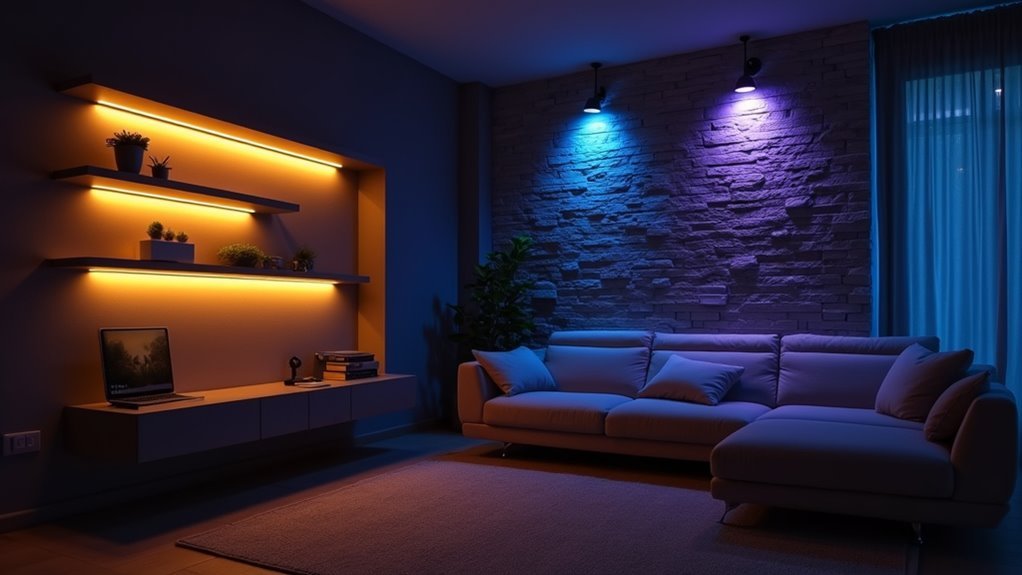
Why does walking into a room bathed in soft blue light instantly make you feel more relaxed, while bright red lighting gets your heart pumping?
Color psychology reveals how different hues directly impact your emotions and energy levels through your smart lighting system.
Red color light energizes and stimulates passion, making it perfect for home gyms and dining areas where you want active engagement.
Warm oranges and yellows promote optimism and creativity in kitchens and children’s rooms.
Blue lighting scenes create tranquil atmospheres ideal for bedrooms and bathrooms where relaxation is key.
Green color light brings balance and peace, enhancing mental well-being in personal spaces.
Purple combines passion with calm, fostering luxury and creativity in social areas.
Understanding these effects helps you craft mood lighting that transforms your space’s emotional impact.
Essential Equipment for Automated Mood Lighting Systems
Now that you understand how colors affect your mood, you’ll need the right equipment to bring these lighting scenes to life in your home.
Transform your understanding of color psychology into reality by equipping your home with the right smart lighting technology.
Start with a starter kit – it’s your best value option and includes a Bridge that activates advanced features and connectivity.
Your essential equipment should include smart bulbs for overhead lighting, light strips for accent placement, and smart plugs for existing fixtures.
The Philips Hue app becomes your control center, letting you customize scenes and set automation schedules.
Enhance your mood lighting setup with accessories like smart switches, motion sensors, and dimmers. These give you instant control without reaching for your phone.
Group your lights into Rooms and Zones through the app to create instant ambiance changes across multiple areas simultaneously.
Programming Custom Lighting Scenes for Different Activities

Once you’ve installed your smart lighting equipment, creating custom scenes reshapes how you experience different activities throughout your day. Your smart home’s lighting control system allows you to program specific scenes using the Philips Hue app.
Set warm white LED lights for relaxation scenes or vibrant colors for entertaining guests. Design movie night scenes with dimmed accent lighting, dinner party atmospheres with elegant color temperatures, or energizing morning routines with bright, cool tones.
Automate these scenes to activate at designated times, creating seamless shifts throughout your day. Experiment with dynamic effects like gradient transitions during gatherings.
Voice control integration lets you switch scenes effortlessly without touching your phone, making your lighting control system truly hands-free and intuitive.
Setting Up Room-Specific Ambient Lighting Controls
After establishing your personalized lighting scenes, you’ll want to organize your smart bulbs into room-specific groups that deliver targeted ambient control throughout your home. Using the Philips Hue app, create dedicated Rooms and Zones that match your living spaces.
| Room Type | Ambient Setting | Smart Control Method |
|---|---|---|
| Bedroom | Soft warm tones | Motion sensors |
| Home Office | Bright white light | Wall switches |
| Living Room | Color gradients | Voice commands |
| Kitchen | Task-focused brightness | Scheduled automation |
| Bathroom | Gentle morning glow | Presence detection |
Configure each room’s lighting to automatically adjust based on time and activity. Install smart accessories like motion sensors for hands-free ambient control, ensuring your lighting responds intelligently to your presence and daily routines.
Creating Dynamic Light Transitions and Scheduling

With your room-specific ambient controls in place, you can enhance your smart lighting system by programming dynamic changes that automatically flow from one scene to another throughout the day.
Smart LED lights excel at creating smooth shifts between different moods and activities.
Use the Philips Hue app’s scheduling features to automatically shift your lighting at predetermined times. Program gradual color and brightness changes that transform your space from energizing morning light to calming evening tones.
Experiment with different change speeds – slow shifts create subtle atmosphere changes, while faster shifts can signal activity changes.
Create dynamic light shifts that mimic natural phenomena like sunrise or sunset.
These automated sequences gradually adjust color temperature and intensity, supporting your daily rhythms while eliminating manual adjustments throughout your routine.
Troubleshooting Common Smart Lighting Scene Issues
You’ll occasionally encounter frustrating moments when your carefully crafted lighting scenes won’t activate or display the wrong colors.
Scene activation problems often stem from connectivity issues or outdated app software, while color synchronization issues can leave your bulbs displaying mismatched hues that ruin your intended mood.
These common hiccups don’t have to derail your smart lighting experience if you know the right troubleshooting steps.
Scene Activation Problems
Nothing’s more frustrating than setting up the perfect lighting scene only to have it fail when you need it most.
Scene activation problems with smart lighting systems often stem from simple connectivity issues that you can quickly resolve.
First, verify all devices are powered on and within your hub’s range.
Check your smart lighting app for software updates, as outdated versions frequently cause malfunctions.
Review your scene settings in the app to confirm they’re properly configured with correct brightness levels and color selections.
Test your internet connection since weak connectivity disrupts communication between devices.
If you’re using voice commands, verify you’re speaking the exact scene names and that your voice assistant is properly linked to your lighting system.
Color Synchronization Issues
Why do some bulbs in your lighting scene display different colors even when they’re supposed to match perfectly?
Color synchronization issues typically stem from outdated firmware, incompatible devices, or weak Wi-Fi connections. Start by updating your smart lighting system’s firmware, as these updates often resolve synchronization bugs affecting LED light bulbs and recessed lights.
Verify that all your devices support the same color families and synchronization features within your home automation setup.
Test your Wi-Fi signal strength throughout your space, since weak connections cause delays that disrupt color coordination.
Use your app’s scene gallery to test various settings and identify whether specific scenes cause problems.
If issues persist, reset the affected bulbs and reconfigure them in your lighting app to restore proper synchronization.
Frequently Asked Questions
How Much Does It Cost to Install a Complete Smart Mood Lighting System?
You’ll spend $500-3,000 for a complete smart mood lighting system installation. Costs depend on your home’s size, fixture quality, and complexity. Professional installation adds $200-800, while DIY saves money but requires technical skills.
Can Smart Lighting Scenes Work During Power Outages or Internet Disruptions?
You’ll lose smart lighting functionality during power outages since lights need electricity. Most systems also require internet connectivity for remote control and automated scenes, though some hubs offer limited local operation during network disruptions.
Are Smart Bulbs Compatible With Existing Dimmer Switches and Ceiling Fans?
Smart bulbs often aren’t compatible with traditional dimmer switches since they can cause flickering or damage. You’ll need to replace dimmers with regular switches. However, many smart bulbs work fine with ceiling fans.
What’s the Average Lifespan of Smart Bulbs Compared to Traditional LED Bulbs?
Smart bulbs typically last 15,000-25,000 hours, while traditional LEDs reach 25,000-50,000 hours. You’ll replace smart bulbs sooner due to their electronic components, but they’re still more durable than incandescent options.
Do Smart Lighting Systems Significantly Increase Monthly Electricity Bills?
Smart lighting systems don’t considerably increase your electricity bills. You’ll actually save money since smart bulbs use less energy than traditional incandescent bulbs, and you can optimize usage through scheduling and dimming features.




Leave a Reply