
You’re probably wasting energy on lighting you don’t need. Smart vacancy sensors can change that—but which ones actually deliver results? From Lutron’s advanced filtering to TOPGREENER’s expansive coverage, you’ve got options. The question isn’t whether these devices save money; it’s finding the right fit for your space and setup.
| Lutron Caseta Smart Lighting Vacancy Motion Sensor | 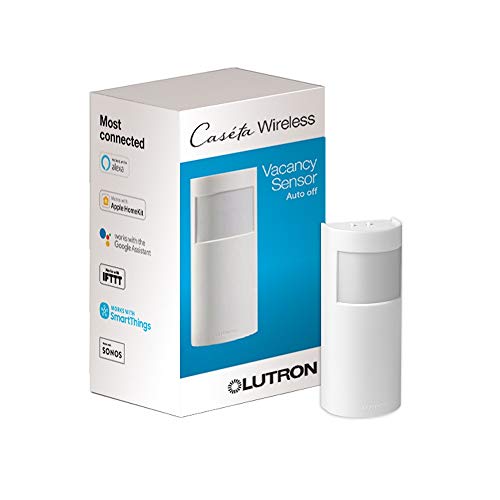 | Best Smart Integration | Detection Mode: Vacancy only (auto off) | Field of View: 180° | Installation Type: Battery-powered wireless (no wiring) | CHECK ON AMAZON | Read Our Analysis |
| Lutron Maestro Motion Sensor Light Switch (2 Pack) |  | Best Traditional Install | Detection Mode: Occupancy and Vacancy modes | Field of View: Not specified | Installation Type: Hardwired wall switch | CHECK ON AMAZON | Read Our Analysis |
| Lutron Caseta Smart Motion Sensor (PD-OSENS-WH) | 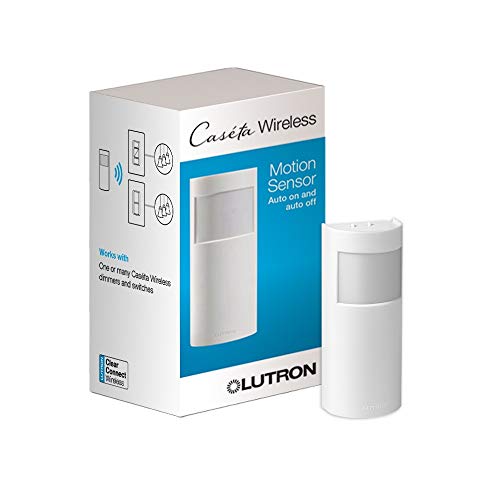 | Best App Control | Detection Mode: Occupancy (auto on/off) | Field of View: 180° | Installation Type: Battery-powered wireless (no wiring) | CHECK ON AMAZON | Read Our Analysis |
| Lutron Maestro Motion Sensor Light Switch White |  | Most Affordable | Detection Mode: Occupancy and Vacancy modes | Field of View: Not specified | Installation Type: Hardwired wall switch | CHECK ON AMAZON | Read Our Analysis |
| Leviton Decora Vacancy Motion Sensor In-Wall Switch |  | Best Flexible Wiring | Detection Mode: Vacancy only (manual on) | Field of View: 180° | Installation Type: Hardwired wall switch | CHECK ON AMAZON | Read Our Analysis |
| Kasa Smart Motion Sensor Light Switch (2-Pack) |  | Best Voice Control | Detection Mode: Occupancy (auto on/off) | Field of View: Not specified | Installation Type: Hardwired wall switch (requires neutral) | CHECK ON AMAZON | Read Our Analysis |
| TOPGREENER PIR Motion Sensor Light Switch White | 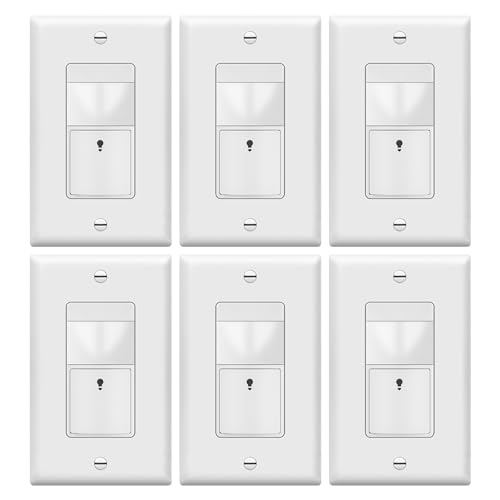 | Best Budget Pack | Detection Mode: Occupancy and Vacancy modes | Field of View: 180° | Installation Type: Hardwired wall switch | CHECK ON AMAZON | Read Our Analysis |
More Details on Our Top Picks
Lutron Caseta Smart Lighting Vacancy Motion Sensor
Are you tired of wasting energy on lights left on in empty rooms? The Lutron Caseta Smart Lighting Vacancy Motion Sensor (PD-VSENS-WH) automatically turns off your connected devices when you leave. This vacancy-only sensor detects fine motion three times better than competitors, covering 180 degrees within 60 feet. You can control multiple switches, dimmers, fan controls, and smart shades simultaneously. With a ten-year battery life—three times longer than industry standard—you’ll enjoy years of hassle-free operation. Install it freestanding or wall-mounted anywhere: bathrooms, laundry rooms, hallways, or garages. It’s compatible with most Caseta models and meets California Title 24 requirements.
- Detection Mode:Vacancy only (auto off)
- Field of View:180°
- Installation Type:Battery-powered wireless (no wiring)
- Daylight Sensing:No
- Adjustable Time Delay:Not specified
- Neutral Wire Required:No
- Additional Feature:Vacancy-only automatic shutoff
- Additional Feature:10-year battery life
- Additional Feature:Controls multiple device types
Lutron Maestro Motion Sensor Light Switch (2 Pack)
Looking for a reliable motion sensor that won’t drain your energy bills? The Lutron Maestro Motion Sensor Light Switch (2 Pack) offers hands-free convenience with automatic on/off functionality. You’ll appreciate its dual modes: Occupancy automatically turns lights on when you enter, while Vacancy requires manual activation but turns them off automatically. The built-in daylight sensor prevents unnecessary lighting in bright rooms, and you can program off-delays from one to thirty minutes. Installation takes about fifteen minutes, and it supports up to 150W CFL/LED bulbs. With two switches included, you’re equipped to automate multiple rooms efficiently.
- Detection Mode:Occupancy and Vacancy modes
- Field of View:Not specified
- Installation Type:Hardwired wall switch
- Daylight Sensing:Yes
- Adjustable Time Delay:1, 5, 15, 30 minutes
- Neutral Wire Required:No (flexible install option)
- Additional Feature:Learns preferred light levels
- Additional Feature:Two-pack included
- Additional Feature:15-minute quick installation
Lutron Caseta Smart Motion Sensor (PD-OSENS-WH)
If you’re tired of replacing motion sensor batteries every couple of years, the Lutron Caseta Smart Motion Sensor (PD-OSENS-WH) delivers an exceptional 10-year battery life—three times longer than industry standards—making it ideal for homeowners who want reliable automation without constant maintenance. This wireless sensor detects fine motion across a 180° field of view up to 60 feet away, automatically turning off lights when you leave a room. You’ll customize its active hours by time of day or sunrise/sunset, controlling multiple Caseta switches, dimmers, and smart shades per device. Pairing with the Caseta Smart Hub unlocks app-based scheduling, giving you seamless energy savings throughout your home.
- Detection Mode:Occupancy (auto on/off)
- Field of View:180°
- Installation Type:Battery-powered wireless (no wiring)
- Daylight Sensing:No (customizable via app)
- Adjustable Time Delay:Customizable via app
- Neutral Wire Required:No
- Additional Feature:App-based customization with hub
- Additional Feature:Active hours time scheduling
- Additional Feature:Per-device level settings
Lutron Maestro Motion Sensor Light Switch White
Do you struggle with kids leaving lights on throughout your home? The Lutron Maestro Motion Sensor Light Switch White (MS-OPS2-WH) solves this problem with automatic operation. This switch detects occupancy and turns lights on when you enter, then off when you leave—no manual switching needed. You’ll customize delay settings from 1 to 30 minutes and choose between Occupancy or Vacancy modes. The sensor learns your preferred brightness levels and won’t activate lights in daylight. It installs in about 15 minutes and supports up to 150-Watt CFL/LED bulbs, making it perfect for bathrooms, garages, and laundry rooms. You’ll reduce energy waste while eliminating worry about forgotten lights.
- Detection Mode:Occupancy and Vacancy modes
- Field of View:Not specified
- Installation Type:Hardwired wall switch
- Daylight Sensing:Yes
- Adjustable Time Delay:1, 5, 15, 30 minutes
- Neutral Wire Required:No (flexible install option)
- Additional Feature:Single unit purchase option
- Additional Feature:Ideal for children’s rooms
- Additional Feature:Ground wire flexibility
Leviton Decora Vacancy Motion Sensor In-Wall Switch
Want a vacancy sensor that won’t demand a neutral wire during installation? The Leviton Decora Vacancy Motion Sensor is your answer. This manual-on switch automatically turns lights off when you leave the room, offering a 180° field of view covering up to 900 square feet. You’ll customize light sensitivity and timeout settings by holding the paddle. It handles 150W LED/CFL or 250W incandescent loads, fitting slim into most wallboxes. The ground wire’s required, but the neutral’s optional. Plus, you can swap faceplate colors from white to black, gray, or brown using the DOSKT kit, making it both functional and stylish.
- Detection Mode:Vacancy only (manual on)
- Field of View:180°
- Installation Type:Hardwired wall switch
- Daylight Sensing:No
- Adjustable Time Delay:Not specified
- Neutral Wire Required:No (optional)
- Additional Feature:Slim profile wallbox fit
- Additional Feature:Interchangeable color faceplate kits
- Additional Feature:900 sq. ft. coverage
Kasa Smart Motion Sensor Light Switch (2-Pack)
Looking for a motion sensor that doesn’t require a hub or complicated wiring? The Kasa Smart Motion Sensor Light Switch delivers hands-free convenience with advanced motion detection and daylight sensing that prevents daytime activation. You’ll appreciate the dual modes—Smart Mode adjusts triggers based on your routine, while Away Mode simulates occupancy when you’re gone. This 2-pack switches work with Alexa, Google Assistant, and Samsung SmartThings for seamless voice and app control from anywhere. Supporting up to 600W incandescent bulbs, they’re ideal for bedrooms, hallways, and bathrooms. Setup’s straightforward through the Kasa app, and you’re protected by a 2-year warranty backed by seven million satisfied users.
- Detection Mode:Occupancy (auto on/off)
- Field of View:Not specified
- Installation Type:Hardwired wall switch (requires neutral)
- Daylight Sensing:Yes
- Adjustable Time Delay:Preset time (adjustable)
- Neutral Wire Required:Yes
- Additional Feature:Voice control compatibility included
- Additional Feature:Away mode simulates occupancy
- Additional Feature:No hub required operation
TOPGREENER PIR Motion Sensor Light Switch White
If you’re seeking a practical motion sensor that installs without rewiring your entire electrical system, the TOPGREENER PIR Motion Sensor Light Switch White delivers straightforward functionality. This six-pack features universal wiring that requires no neutral or ground wire, making installation simpler than traditional switches. You’ll toggle between occupancy and vacancy modes to match your needs, with adjustable time delays ranging from 15 seconds to 30 minutes. The sensor covers up to 1,200 square feet with a 180-degree field of view, handling loads from 5–150W LED or up to 300W tungsten. Operating reliably between 32–104°F, this UL-listed solution works for single-pole applications only.
- Detection Mode:Occupancy and Vacancy modes
- Field of View:180°
- Installation Type:Hardwired wall switch
- Daylight Sensing:No
- Adjustable Time Delay:15 sec, 10, 20, 30 minutes
- Neutral Wire Required:No
- Additional Feature:Six-pack bundle included
- Additional Feature:No ground wire required
- Additional Feature:Wall plate included
Factors to Consider When Choosing Smart Vacancy Sensors
When you’re selecting a smart vacancy sensor, you’ll want to evaluate several key factors that directly impact performance and savings. You should consider battery life and power requirements, motion detection range, installation complexity, compatibility with your existing smart home systems, and whether the device uses occupancy or vacancy modes. Each factor plays a crucial role in determining which sensor best fits your specific needs and living situation.
Battery Life and Power
Battery life stands as one of the most critical factors in selecting a smart vacancy sensor, since you’ll want to minimize maintenance hassles and replacement costs. Most models advertise around 10 years of battery life, though some specify 3x longer than the industry average, extending your maintenance intervals considerably.
You should consider how frequent motion detection and wireless transmission affect drain rates. Devices equipped with low-power radios and efficient sensing capabilities maximize longevity. Battery type matters too—coin cell sensors may require replacement sooner depending on usage patterns and environmental conditions like temperature and humidity.
Non-wireless, battery-powered sensors eliminate neutral wiring complications during installation but rely entirely on battery performance. Evaluate your specific needs and environmental factors to choose a sensor that truly matches your maintenance expectations.
2. Motion Detection Range
How far does a motion detector actually need to reach? Most vacancy sensors advertise a sensing range around 60 feet, which easily covers multiple switches or devices within a typical room. You’ll want to consider the sensor’s 180-degree field of view, ensuring it detects motion across a broad area without blind spots.
Rather than focusing solely on distance, evaluate coverage by square footage. Many models specify coverage up to 900 square feet, giving you a clearer picture of how well they’ll perform in your space. Some sensors emphasize fine motion detection to reduce false offs, which proves especially valuable in low-activity areas where you don’t want lights unexpectedly turning off.
3. Installation Complexity
Installation ease can make or break your smart vacancy sensor experience. You’ll want to consider whether you need neutral wiring—some sensors work without it, simplifying retrofits in older homes. Single-pole configurations offer the easiest setup since they only require line and load connections, eliminating complex three-way wiring scenarios.
Your mounting options also matter. Wall-box installations integrate seamlessly into existing outlets, while surface-mount and freestanding designs provide flexibility for tricky spaces like corners. Battery-powered models eliminate in-wall wiring entirely, though you’ll need to budget for periodic replacements.
Don’t overlook setup requirements either. Integrated ground connections and hub or app compatibility can add initial configuration steps. Assess your home’s existing infrastructure and technical comfort level before choosing your sensor.
4. Compatibility Requirements
Once you’ve settled on installation logistics, you’ll need to verify that your chosen sensor actually works with your existing smart home setup. Check that the sensor supports your control system protocol—whether that’s Caseta, Maestro, Leviton, Z-Wave, or Wi-Fi—and confirm it’s compatible with your hub or automation ecosystem. You’ll also want to verify load ratings match your lighting needs: CFL/LED fixtures need 150W capacity, incandescent requires 250W, and low-voltage systems need 200W. Determine if you’re installing single-pole or multi-pole configurations, and confirm whether the sensor requires a neutral wire or operates without one. Finally, ensure the sensor’s occupancy or vacancy mode aligns with your usage pattern—automatic on/off for occupied spaces or manual-on with automatic shutoff for others.
5. Occupancy Vs Vacancy
Why does your sensor’s operational mode matter so much? It fundamentally determines how your lights behave and whether they’ll meet your building’s code requirements.
Occupancy sensors automatically turn lights ON when they detect motion and OFF after a timeout period. They’re convenient for high-traffic areas but don’t comply with regulations like California Title 24.
Vacancy sensors only turn lights OFF automatically. You’ll manually switch them ON when re-entering spaces. While they require more user interaction, they satisfy strict energy codes that prohibit automatic activation.
Your choice depends on your location’s requirements and your priorities. Need compliance? Choose vacancy mode. Prefer maximum convenience? Select occupancy mode. Both offer configurable off-delay times ranging from one to thirty minutes, letting you balance energy savings with practical lighting needs.
6. Automation Customization Options
How much control do you want over your lighting automation? That’s the question you’ll need to answer when evaluating customization options.
You can choose per-device control, where one sensor manages multiple switches or fixtures within a 60-foot range and 180-degree field of view. This setup lets you tailor automation to specific zones in your home.
Scheduling and time-based triggers align your lights to your routine, activating during active hours or syncing with sunrise and sunset. Off-delay settings—typically 1, 5, 15, or 30 minutes—determine how long lights remain on after vacancy detection.
You’ll also find adjustable light level sensitivity, manual override options, and mode switching between occupancy and vacancy. These features let you personalize performance based on your preferences and needs.
7. Energy Savings Potential
The energy savings you’ll realize from smart vacancy sensors depends on several key factors working together. First, consider your sensor’s coverage capability—models with 180° sensing and up to 60 ft range eliminate wasted lighting across entire rooms, maximizing your reductions. Daylight sensing features boost savings by preventing unnecessary activation in already bright spaces, so you’ll want this functionality if your rooms receive natural light.
Your behavioral choice matters greatly too. Selecting manual-on versus auto-on modes directly influences how frequently lights activate when you enter spaces. Manual-on typically conserves more energy since you control usage consciously. Finally, battery-powered sensors with 10-year lifespans reduce replacement frequency, lowering your energy and material costs over time. Combining these factors strategically ensures you’ll optimize your facility’s energy efficiency substantially.
Frequently Asked Questions
How Much Money Can I Save Annually by Installing Smart Vacancy Sensors?
You’ll typically save $300-$800 annually by installing smart vacancy sensors, depending on your facility’s size, occupancy patterns, and local electricity rates. Larger commercial spaces see greater savings.
Are Smart Vacancy Sensors Compatible With Existing Home Automation Systems?
You’ll find that most smart vacancy sensors work with popular home automation systems like Google Home, Alexa, and Apple HomeKit. However, you should verify compatibility with your specific system before purchasing to ensure seamless integration.
What Is the Average Lifespan and Warranty of Smart Vacancy Sensors?
You’ll typically find smart vacancy sensors lasting 5-10 years with standard 2-3 year warranties. Many manufacturers offer extended protection plans. You can maximize lifespan by installing them properly and maintaining clean sensors regularly.
Can Smart Vacancy Sensors Work in Outdoor or Wet Environments?
You can use outdoor-rated smart vacancy sensors in wet environments, but you’ll need models specifically designed with weatherproof IP65 or higher ratings. Standard indoor sensors won’t withstand moisture or temperature extremes effectively.
Do Smart Vacancy Sensors Require Professional Installation or Can Homeowners Install Them?
You can install most smart vacancy sensors yourself without professional help. They’re designed for easy DIY installation with simple wiring or wireless setups. However, you’ll want to follow manufacturer instructions carefully to ensure proper function and safety.




Leave a Reply